Features: A cloud-based AQM system that records and displays real-time data for a wide range of parameters, such as particulate matter, pollutant gases, temperature, humidity, and barometric pressure. With active internet connection, user able to monitor this data live from computer or phone. The monitoring system available with four fundamental sensors: particulate matter, temperature, relative humidity (RH), and barometric pressure (BMP). Additionally, it supplied with minimum four gas sensors. Configuration which track indoor AQ by detecting PM2.5, PM10, and VOCs and identify harmful gases like Carbon Monoxide (CO), Carbon Di-oxide (CO2), Nitrogen Dioxide (NO2), and Volatile Organic Compounds (VOCs). It meticulously designed to withstand extreme conditions, operate reliably in temperatures as low as -20 °C and humidity levels up to 99%. Suitable for both indoor and outdoor environments. Integrated Heater for maintaining stable temperature, melting snow, ensuring precise measurement
Technical Specifications:
Particulate Matter Measurements:
Range: 0 to 1000 µg/m3. Mass concentration measurements of PM1, PM2.5, PM4 and PM10. Measurement resolution: 1 µg/m3. Sensor lifetime: 10 years. Mass concentration accuracy: PM1 and PM2.5: 5% (0 - 100 ?g/m3), 10% (100 - 1000 ?g/m3). PM4 and PM10: 25% (0 - 1000 ?g/m3). Startup time: <60s. Response time: <30s. Acoustic emissions level: 24 dBA at 0.2m. Long term acoustic emission level drift: +0.5 dB(A). Operating range: Temperature: -20 to 50°C. Relative humidity: 20 - 99% (non-condensing). Barometric pressure: 300 - 1200 mbar.
Temperature, relative humidity, and barometric pressure measurements:
Temperature: Measurement range: -40 to 85°C. Accuracy: Typical ±0.1°C (0 to 60°C), max. ±0.3°C (-40 to 85°C). Resolution: 0.01°C. Relative humidity: Measurement range: 0 to 99% (non-condensing). Accuracy: Typical ±1%; max. 2% (0 to 90%) and ±3% (91 to 100%). Resolution: 0.01%.
Barometric pressure: Measurement range: 300 to 1200 mbar (30 to 120 kPa). Accuracy: ±1 mbar (0 to 65°C). Resolution: 0.01mbar.
Gas sensors should be included: Formaldehyde (CH2O):
Measurement range: 0 - 5 ppm. Maximum overload: 10 ppm. Accuracy: ? 0.05 ppm. Response time: <120s. Repeatability: <1%. Lower detectable limit (LDL): ? 0.05ppm. Resolution: 0.01 ppm. Expected life time: >3 years in air. Long-Term Drift: <1% / month. Operating Temperature range: -20°C to 55°C. Operating Pressure range: 800 to 1200 hPA. Operating humidity range: 15 - 95%.
Cross sensitivity: Hydrogen Cyanide (<1ppm in 10ppm concentration). Hydrogen (<3ppm in 100ppm concentration). Sulfur Dioxide (<1ppm in 10ppm concentration).
Carbon Monoxide (CO):
Measurement range: 0 - 1000 ppm. Maximum overload: 1000 ppm. Accuracy: ? 2ppm. Response time: <30s. Repeatability: <1%. Lower detectable limit (LDL): ?2ppm. Resolution: 0.1 ppm. Expected lifetime: >5 years in air. Cross sensitivity: Hydrogen (20 ppm in 100 ppm concentration). Operating Temperature range: -40°C to 55°C. Operating Pressure range: 800 to 1200 hPA. Operating humidity range: 15 - 95%
Carbon Di-oxide (CO2):
Range: 400 - 5000 ppm. Accuracy: ± (50ppm + 2.5% of reading): 400 - 1000 ppm. ± (50ppm + 3% of reading): 1001 - 2000ppm. ± (40ppm + 5% of reading): 2001 - 5000ppm. Repeatability: ± 10ppm. Response time: 60s. Additional accuracy drift after five years: ± (5ppm + 0.5% of reading)
Nitrogen Dioxide (NO2):
Measurement range: 0 - 50 ppm. Maximum overload: 100 ppm. Accuracy: ? 0.5 ppm. Response time: <30s. Repeatability: <1%. Resolution: 0.1 ppm. Expected life time: >3 years in air. Long-Term Drift: <1%. Operating Temperature range: -40°C to 55°C. Operating Pressure range: 800 to 1200 hPA. Operating humidity range: 15 - 95%.
Cross sensitivity: Carbon Monoxide (3ppm in 50ppm concentration). Ozone (0.1ppm in 0.25ppm concentration). Sulfur Dioxide (-0.51ppm in 1ppm concentration).
Power supply and Enclosure:
Power supply: AC/DC adapter included.
Weatherproof enclosure: Protection from rain and sunlight exposure. The enclosure has Top cover, Status LED, Air inlet & outlet facility, Sensor probe connector, Power Jack connector etc. The status LED blinking interpret below conditions: 0 - Initialize device. 1 - Normal Operation. 2 - No internet connection. 3 - Sensor error. 4 - Internal backup storage is full.
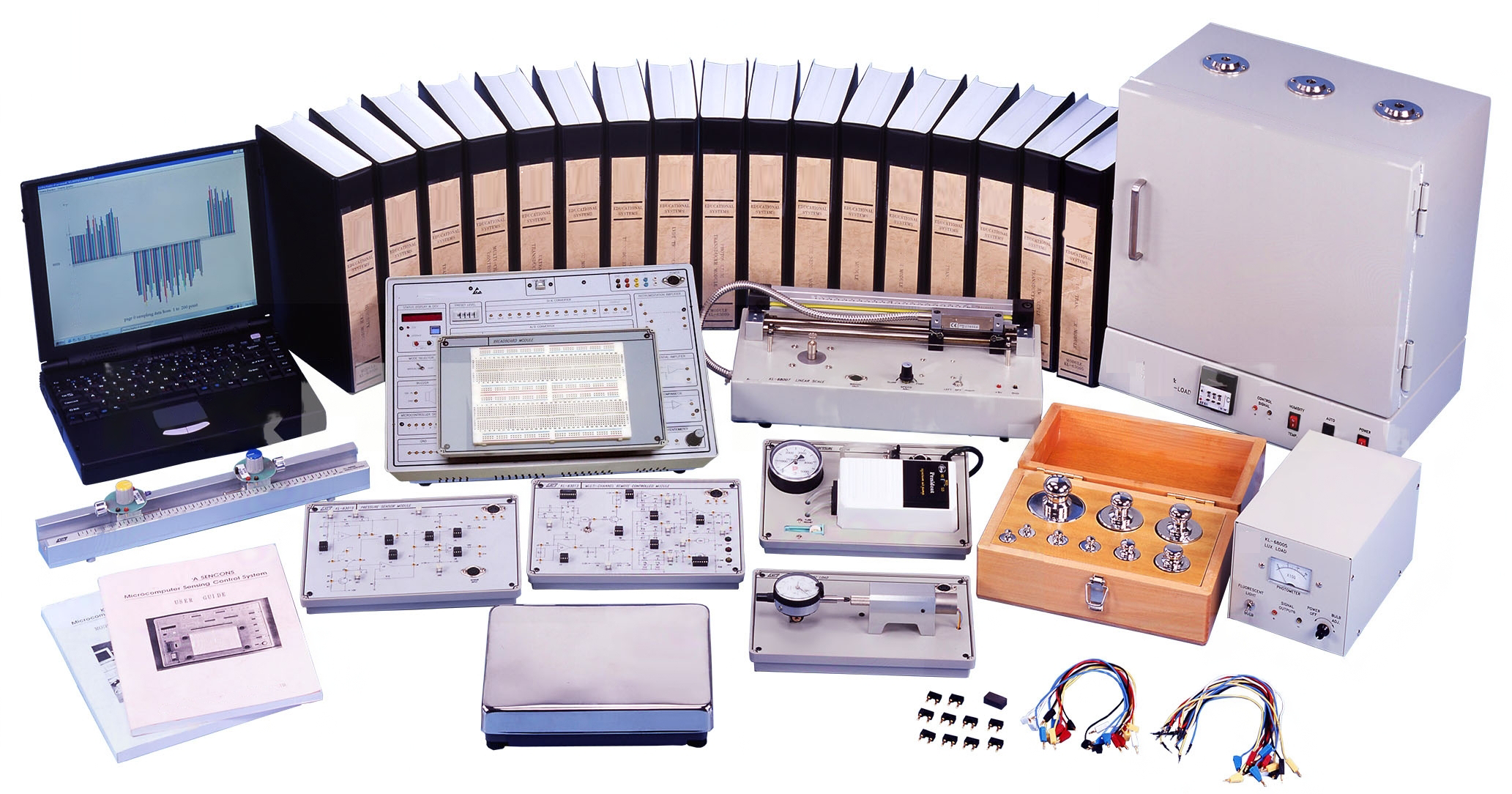
The Sensor Circuits Training System consist of below modules:
Photo Sensor Circuits:
CdS sensor circuit, operating wavelength: 500 nm ~ 580 nm. Photodiode circuit, operating wavelength: 760 nm ~ 1000 nm. Phototransistor circuit, operating wavelength: 430 nm ~ 670 nm. Photo interrupter circuit, operating wavelength: 940 nm.
Switch Sensor Circuits:
Tilt switch circuit, conduction angle: 55 ~ 125°. Micro switch circuit, SW normal state: OFF, LED indicator operating state. Touch switch circuit, SW normal state: OFF, LED indicator operating state. Reed switch circuit, SW normal state: OFF, LED indicator operating state. Vibration switch circuit, SW normal state: ON, LED indicator operating state.
Temperature Sensor Circuits:
MCP9701 temperature sensor circuit, measurement range: -40°C ~ +125°C. LM335 temperature sensor circuit, measurement range: -40°C ~ +100°C. TC620 temperature sensor circuit, measurement range: 0°C ~ +70°C. TC74 temperature sensor circuit, measurement range: -40°C ~ +125°C.
Humidity Sensor Circuits:
H25K5A humidity sensor circuit, measurement range: 20% ~ 90% RH. SI7007 humidity sensor circuit, measurement range: 0% ~ 100% RH. RH818 humidity sensor circuit, measurement range: 0% ~ 100% RH. DHT11 humidity sensor circuit, measurement range: 20% ~ 90% RH.
Infrared Sensor Circuits:
RE200B passive infrared sensor circuit. OTP-628 thermopile infrared sensor circuit. TS-S2NMB thermopile infrared sensor circuit.
Gas Sensor Circuits:
Smoke sensor circuit (Sensing body resistance: 1k? ~ 10 k?, 1000 ppm Isobutane). Natural gas sensor circuit (Sensing body resistance: 2k? ~ 20 k?, 5000 ppm Methane). Alcohol sensor circuit (Sensing body resistance: 100k? ~ 500 k?, 100 ppm Alcohol). CO sensor circuit (Sensing body resistance: 2k? ~ 20 k?, 100 ppm CO).
Ultrasonic Sensor Circuits:
Sound generator, frequency of 850 ± 100 Hz and 1700 ± 150 Hz. Ultrasonic transmitter, operating frequency of 40 kHz. Ultrasonic receiver, operating frequency of 40 kHz.
Color Sensor Circuits:
Red sensor circuit (Operating wavelength: 590nm ~ 720nm). Green sensor circuit (Operating wavelength: 480nm ~ 600nm). Blue sensor circuit (Operating wavelength: 400nm ~ 540nm).
IoT Applications Using Arduino Microcontroller (I) module:
Flashing and Breathing LED Circuit (LED output mode). Buzzer Tone Circuit (Active buzzer mode). Touch Switch Circuit (LED and buzzer output mode). Photo and Magnetic Sensor Circuit (LCD displayer output mode). Temperature and Humidity Sensor (LCD displayer output mode). LCD Displayer of 16 x 2 characters, support IIC protocol.
IoT Applications Using D1 Mini Microcontroller (I) module:
Dancing LED Circuit (LED output mode). Buzzer Tone Circuit (Active buzzer mode). Push Button Switch Circuit (LED and buzzer output mode). Voice Control and Tilt Switch Circuit (LED output mode). Alcohol Sensor Circuit (LED output mode). Water Level Sensor Circuit (LED output mode).
IoT Applications Using D1 Mini Microcontroller (II) module:
CdS Sensor Circuit (LED output mode). Vibration Switch Circuit (LED output mode). Photo Interrupter Circuit (LED output mode). Earthquake and Ultrasonic Sensor Circuit (LCD displayer output mode). RFID Reader Circuit (LCD displayer output mode). LCD Displayer of 16 x 2 characters, support IIC protocol.
Facial Recognition and Home Access Control Module:
ESP32-CAM Module Facial Recognition Circuit (MCU - 32 bits dual core chip with 600 DMIPS processing power). Electromagnetic door locked circuit (LED output mode). LED and Buzzer alarm circuits (LED and Buzzer output mode).
Function Generator and DC Power Supply Module:
Waveforms: Sine, Triangle, Square, TTL Pulse. Amplitude: >10 Vpp. Impedance: 50? ±10%. Duty Control: 30% ~ 60%. Display: 6-Digit LED Display. Frequency Range: 10Hz ~ 100 kHz (4 Ranges), 100Hz ~ 1 MHz (4 Ranges). Frequency Control: Separative Coarse and Fine Tuning. Constant Voltage Output: ±5V, ±12V. Variable Voltage Output: 0V ~ ±15V. Power source: 220 ~ 230V AC, 50Hz, 1 Phase.
Standard accessories with printed operation manual.
Software:
Connecting computer or phone: Activation of the device by powering it up. Once the LED begins flashing establishment of a connection with a computer or phone will have to be initiated. Wi-Fi settings on computer or phone will have to be accessed and computer or phone will have to be connected using the password as mentioned in the operation manual. Upon successful connection, the system configuration panel will automatically launch in a browser window. If the window does not appear automatically, user must Open a browser, enter 192.168.4.1 in the address bar and Press “Go”. Click on the “Configure Wi-Fi” function and choosing of Wi-Fi network from the available Wi-Fi networks list.
Configuration: Configuration of various settings for the device, such as the device name, user ID or email, time zone, logging interval, and running average for PM data can be done by clicking on Setup.
Device name: The designated name to serve dual purpose: it employed in the cloud and also appear as the Wi-Fi name when connecting a phone or desktop for configuration.
Time zone: Selection of the suitable time zone and this setting used to record time data within the microSD card.
Log Interval: This feature allows users to choose their preferred logging interval, ranging from 15 seconds to 1 hour. Available logging intervals 15 sec, 30 sec, 1 min, 5 min, 10 min, 15 min, 30 min and 1 hour.
Running Average for PM Data: This configuration determines whether the device use a running average.
ON: The system collects PM data every second. Upon logging the data, it computes the average for the complete interval.
OFF: In this scenario, the system refrain from averaging the data throughout the entire interval. Instead, it calculates the average of the data from the last 5 seconds of the logging interval and record that specific value.
Sign in to Cloud: Navigation to Cloud Platform via address mentioned in the operation manual. Come with the landing page that prompts end user for sign-in credentials.
Dashboard Overview: After successfully signing in, end user directed to the dashboard of the Cloud Platform. The dashboard homepage displays a list of connected devices. Visible connected device show details such as device name, model number, device ID, and subscription.
Information: Additionally, there an option to extend or purchase a subscription by clicking on the “Buy Subscription” button.
Data Summary: Data Logger tab in the top left corner available for the end user so that he/she can view the summary of data for a specific device from the list of connected devices on the cloud platform. After selecting the desired device, a summary of data displayed on the screen which show the minimum, maximum, and average values of the data stored in the cloud so far. Continue scrolling find the graphical representation of data.
Live Monitoring: Live data monitoring accessible directly from the dashboard by clicking on the available “Live Data” tab.
Editing Device and Finding Information: Minimum three icons available. “i” symbol which designated for device information. Clicking on it open a small window displaying device information. End user receives the information of current firmware version. Pen and paper sign icon which is designated for editing the device. From here, end user able to modify logger name, set logging intervals, delete the logger, and erase data. Another icon “download data” icon. Clicking on the download icon appear a new window from where data downloading can be done by selecting the date and time. Alternatively, data can be downloaded by selecting from the available time durations listed at the bottom of the data downloading window. It available in the name of “Quick Download”.
Data downloading from microSD card w/o removing: To do this, user must follow the following steps. Power off the device if it is currently powered on. Turn the power back on. From a computer or phone, search for available Wi-Fi networks. Look for a network name that starts with the device name and connect to that network. If prompted, enter the password. The configuration page automatically open. If not, open a browser and type 192.168.4.1 in the address bar. Click on the “Stored Data” button. If a microSD card is present, the files on the microSD card displayed on the screen. Download the files onto computer or phone using the browser.
Accessories:
Probes and sensors as per configuration, Power adapter, Mounting bracket, Zip ties, Double sided foam tape, Screws, Micro SD card, Royal plugs, Printed operation manual etc.